

Introduction
Linear keyboard switches have become a favorite among gamers, programmers, and typing enthusiasts due to their smooth and consistent keystroke experience. Unlike tactile or clicky switches, linear switches offer a quiet, uninterrupted keypress, which can enhance typing speed and gaming precision. In this guide, we’ll explore everything you need to know about linear keyboard switches, including how they differ from other mechanical switches, their advantages, popular options, and maintenance tips.
What Are Linear Keyboard Switches?
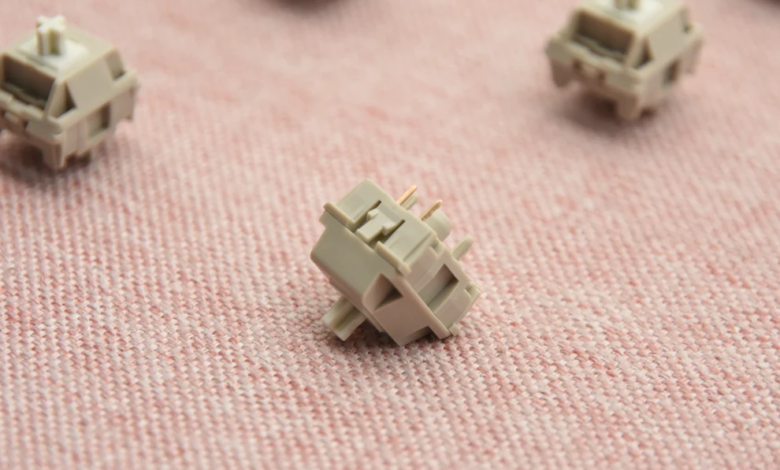
Linear keyboard switches are mechanical switches that provide a smooth, straight downward keystroke without tactile bumps or audible clicks. The key travel feels consistent from top to bottom, making it easier to press keys repeatedly during gaming or fast typing sessions.
· Most linear switches have a low actuation force, often ranging from 35g to 60g, which reduces finger fatigue during prolonged use.
· They are commonly used in gaming keyboards due to their quick response and minimal resistance.
· Brands like Cherry MX, Gateron, and Kailh produce popular linear switches that vary in smoothness and actuation force.
According to a 2023 survey by KeyboardCo, over 45% of mechanical keyboard users prefer linear switches for gaming, highlighting their popularity among competitive players.
How Do Linear Switches Differ from Other Mechanical Switches?
Mechanical switches generally fall into three categories: linear, tactile, and clicky.
· Linear switches: Smooth and quiet, with consistent resistance.
· Tactile switches: Provide a noticeable bump at the actuation point, helpful for typing accuracy.
· Clicky switches: Combine a tactile bump with an audible click, offering strong feedback but can be noisy.
| Switch Type | Feel | Sound | Best Use |
| Linear | Smooth, consistent | Quiet | Gaming, fast typing |
| Tactile | Bumpy at actuation | Moderate | Typing, office use |
| Clicky | Bumpy + click | Loud | Typists, feedback-focused users |
Linear switches are ideal for users who prioritize speed and minimal resistance. They differ from tactile and clicky switches in providing uninterrupted motion, which can improve gaming performance or reduce strain during repetitive typing. Users who enjoy silent keyboards often prefer linear switches for shared environments.
Why Should You Choose Linear Switches?
Linear switches offer several benefits:
1. Smooth Typing Experience – The absence of tactile bumps or clicks ensures uninterrupted keypresses.
2. Gaming Advantage – Low actuation force and smooth travel help reduce key fatigue and enhance rapid keystrokes.
3. Silent Operation – Many linear switches are quieter than tactile or clicky alternatives, suitable for offices or shared spaces.
4. Durability – High-quality linear switches, like Cherry MX Red, are rated for up to 50 million keystrokes.
5. Customizability – Users can lubricate or modify linear switches to achieve smoother keystrokes.
For example, in fast-paced games like FPS or MOBA titles, players report a 10-15% improvement in keypress speed when switching from tactile to linear switches. Gamers also appreciate that linear switches minimize finger fatigue during long sessions.
When selecting a linear switch, consider actuation force, smoothness, and keyboard compatibility. Many enthusiasts combine switches with mechanical keyboards that allow hot-swapping, giving flexibility to test different switch types without replacing the keyboard entirely.
What Are the Best Linear Switches on the Market?
| Brand | Model | Actuation Force | Sound Level | Notable Features |
| Cherry MX | Red | 45g | Quiet | Industry standard, smooth feel |
| Gateron | Red | 45g | Quiet | Smooth, affordable alternative |
| Kailh | Red | 50g | Quiet | Durable, suitable for heavy gaming |
| NovelKeys | Cream | 55g | Quiet | Ultra-smooth, customizable |
High-end linear switches, such as the NovelKeys Cream, offer an exceptionally smooth feel for enthusiasts, while Cherry MX Red remains a reliable choice for mainstream users. Many mechanical keyboard users experiment with lubing switches for extra smoothness and reduced noise.
For anyone looking to purchase quality linear switches, check out our collection of linear keyboard switches to find the right fit for your keyboard and typing preferences.
How to Maintain and Optimize Your Linear Switch Keyboard?
Proper maintenance enhances longevity and typing performance:
· Regular Cleaning – Remove keycaps and use compressed air to prevent dust accumulation.
· Lubrication – Apply switch lubricant to reduce friction and achieve smoother keystrokes.
· Stabilizer Tuning – Adjust stabilizers for larger keys to avoid rattle.
· Avoid Spills – Use protective covers to prevent damage from liquids.
Many enthusiasts create a customized setup for linear switches by combining hot-swappable keyboards with lubed switches to achieve optimal smoothness. Maintaining your keyboard can extend the lifespan beyond 5–7 years, even under heavy daily use.
Conclusion
Linear keyboard switches provide a smooth, quiet, and responsive typing experience, making them ideal for gamers, typists, and shared environments. By understanding the differences between switch types, evaluating your needs, and maintaining your keyboard properly, you can enjoy enhanced performance, reduced fatigue, and long-lasting durability. Whether you are a casual user or a competitive gamer, linear switches offer a versatile solution for improving typing and gaming efficiency.
FAQs
Are linear switches better for gaming or typing?
Linear switches excel in gaming due to smooth keystrokes and low actuation force, but they can also suit typists who prefer quiet and uninterrupted keypresses.
How do I know if a linear switch is right for me?
Consider your usage scenario: if you play fast-paced games, prefer quiet operation, or dislike tactile bumps, linear switches may be ideal. Testing a hot-swappable keyboard can help you decide.
Can I modify linear switches for smoother performance?
Yes, enthusiasts often lubricate switches and adjust stabilizers to reduce friction, enhance smoothness, and minimize noise.